Ah, I love the smell of burned CPUs in the morning…
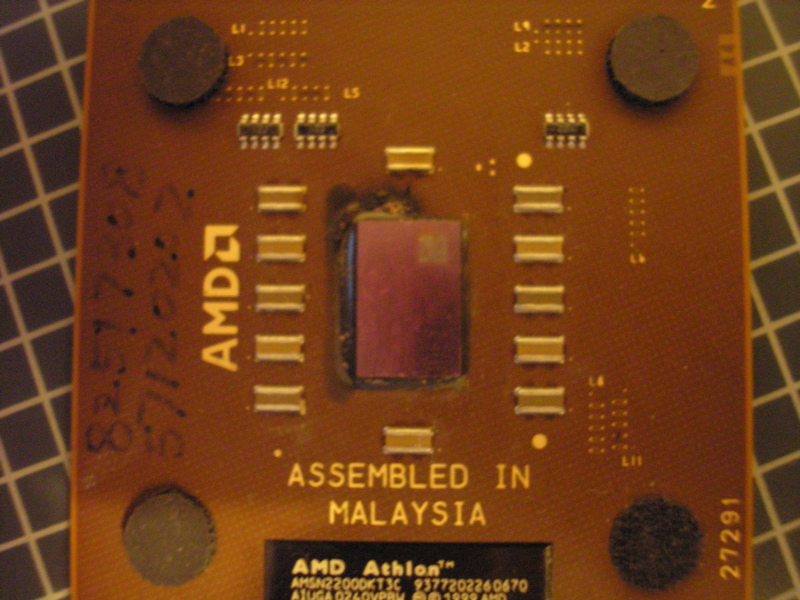

Actually, it smells pretty terrible but this is the first and only time I’ve seen this happen so I thought I’d share!
Ah, I love the smell of burned CPUs in the morning…
Actually, it smells pretty terrible but this is the first and only time I’ve seen this happen so I thought I’d share!
Here’s a quick tip for killing your processes on Linux/UNIX:
kill -1 -1
The first -1 is the signal you are going to send and the second -1 means “every process”. The -1 signal is SIGHUP (hang up) which is basically a nice way of asking a process to terminate (or reload in some cases). The reason sending SIGHUP to every process works to kill only the processes of the account that ran the command is that not every process will respond signals from just anyone. Only processes running at the user who executes the above command will respond to it. Other users processes, including those running as root will not respond. Be careful however, running this as root will attempt to kill ALL processes.
Not all processes will respond to SIGHUP by exiting so sometimes more force is necessary:
kill -9 -1
The -9 signal is SIGKILL (kill program) which should take care of any pesky processes that don’t want to exit nicely.
And that’s that.
Just recently, I discovered that IBM decided to quietly switch their UPS vendor from APC to Eaton (Powerware). We needed to replace a dead IBM UPS 3000 XHV (SmartUPS-3000) and so I ordered a new IBM UPS, the UPS 3000 HV (Eaton 5125). Upon receiving the UPS, I noticed that the battery and power module were rather different. So I boot up the UPS and start configuring the web management card and it hits me… this isn’t an APC UPS, it’s an Eaton! ARG! Why?!? WHY?!? :'(